

Pulsonix can import Schematic designs created in Viewlogic.
Importing Viewlogic Schematic Designs
The process is straight forward:
-
Open the Pulsonix application.
-
In Windows Explorer, locate the source Viewlogic design folder. Viewlogic uses a structured folder setup to store its designs along with the associated libraries.
-
Within this folder structure, locate the sch folder.
-
within this folder there will be a .1 file. This represents the first page of the Schematic design. If there are more pages, they will be numbered, .2, .3, .4 etc. You only need to locate the .1 file.
-
Select the .1 file, now drag and drop it onto Pulsonix.
-
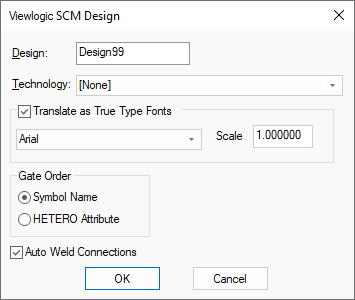
The following dialog will be displayed:
-
Press OK to start the import. Once completed, you will see your imported design.
Using the Dialog
Design Name
By default, this will be the name of the file/design that you selected. You can type a new name to use for the saved design if you wish.
Technology
This drop down list can be used to choose a technology file to base the imported design on. You do not have to base it upon a technology file, as you can select [None] to specify no technology.
Translate as True type fonts
There is no font information (other than text height) in Viewlogic designs. Check Translate as True Type Fonts and this will allow you to select a font which will be used in all Text Styles in Pulsonix.
Scale
If you enter a Scale of anything other than 1.0 the Text Style Height will be scaled by this factor.
Gate Order
In Pulsonix gates are given an identifier for the ordering. There is no equivalent in Viewlogic. Use the Gate Order radio buttons to determine which method to order the gates. Check Symbol Name to ensure gates will be ordered alphabetically by symbol name. Check HETERO attribute and if this Viewlogic attribute is found on a part the order will try and be determined by the attribute value.
Auto Weld Connections
Sometimes when connections are imported they do not always exactly start or end at an appropriate connect point. Check Auto Weld Connections to try and force them to start or end on a connect point.
Related Topics
Open |