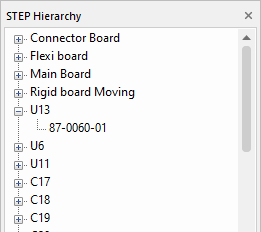
The Hierarchy Bar allows you to view information about the selected item in your 3D View.
Locating this option
Available from: View menu > STEP Hierarchy Bar option
Using the dialog
On selection, the bar will display all boards in your design, enclosures and components.
By selecting the small + next to the name, you can expand the selection.
Selecting an item in the tree will select it in the 3D View.
With an item selected, use the context menu for the following options:
- Toggle Item Visibility - Show or hide this item within the 3D viewer. This does not affect the visibility of the item when output to a STEP file.
- View Item Extents - Position the view to show the extents of this item. This is useful to help find specific items in a complicated scene.