

This command will either run a Design Rules Check on a PCB design, or run an >Electrical Rules Check on a Schematics design. The command will run the appropriate checker without using a dialog, checking the Acceptance Rule Set saved in the design.
Using The Dialog
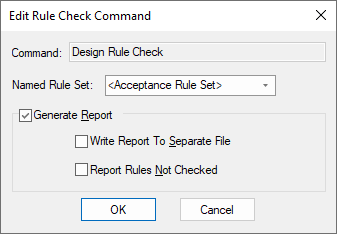
Named Rule Set - Choose a named rule set from the list, or create a new one to run the checks. An empty
string will run the in built named rule set <Acceptance rule set>.
Generate Report - Choose if a rule checker report is to be generated.
Write Report To Separate File - Leave blank to include the report into the report file generated when
running the Formattable Report.
Report Rules Not Checked - Include into the report a list of the rules not forming part of the Acceptance
Rule Set, and hence not checked.
Example use of Rule Check
Rules Check
Run Report "Net completion Report"
Run Report "Unfinished Items Report"
Related Topics
Design Rules Check | Electrical Rules Check | Report Maker | Generate Reports