

This tab allows you to set the defaults for a new Net Style in a PCB design. In particular, the default Via and default Track styles added initially. If a Net Style already exists, a new Net Style will created based on the currently selected row and these defaults will be ignored.
Shortcuts
Default Keys: Shift+D
Default Menu: Setup
Command: Design Settings
Locating this option
Available from:
Setup menu > Design Settings option > Defaults > Net Styles page
Setup menu > Technology option > Design Settings > Defaults > Net Styles page
Using the Net Styles Defaults Tab
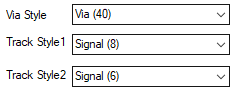
Via Style
Choose a suitable Pad Style for the Via from the drop down list defined in the Technology Pad Styles dialog.
Track Style1, Track Style2
The Track Styles 1 and 2 define the two default track styles when creating a new
definition in the Net Styles dialog.
Select a Track Style from the list presented from the
Technology Track Styles dialog.
Related Topics
Technology Overview | Technology Pad Style | Technology Track Style | Insert Track | Insert PCB Connection