

This dialog is displayed when the Properties option is chosen with an Error Item selected.
Shortcuts
Default Keys: I or Alt+Enter
Default Menu: Edit
Command: Properties
Locating this option
Available from: Edit menu > Properties option
Available from: Context menu > Properties option
Available from: Shortcut key > I
How Errors are Created
You use the Electrical Rule Check option to find any items that disobey the design rules. This will produce text based error indicators, either where the violation is or between the two items which cause the error.
You can use the ERC Errors Browser to help you find the errors that have been produced by the check.
The Error Properties Dialog
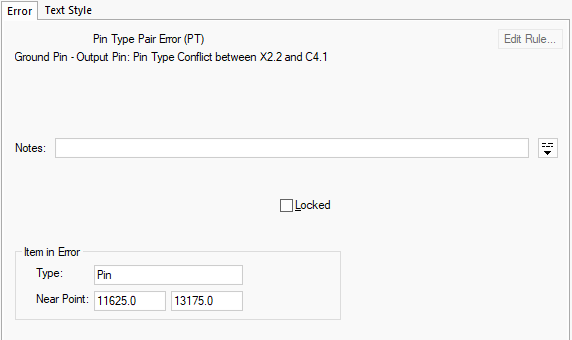
The dialog gives information on the type of error. More information on the types of error which can be produced is available on the Electrical Rule Check page.
Locked allows you to lock an error. A locked error is not normally cleared when performing a Electrical Rule Check and is reported separately. This feature is for marking errors which are considered acceptable by the designer.
Item in Error reports the type of item that is included in the error and the coordinate of the Near Point for the X and Y coordinates.