

This dialog is used to select whether the NLSD program runs as a normal application or as a Windows service, and where the program is to run.
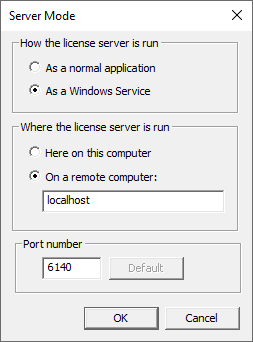
How the license server is run
As a normal application
NLSD can be run as a Windows console application. This is not the usual method of running the license server as it requires someone to be logged into the computer to be able to run it. However, it can be useful to use this mode when first setting up your licensing because the messages output by NLSD can be viewed directly on the screen rather than having to go and look in a log file.
As a Windows Service
The normal method of running network licensing is to install and run it as a Windows service. This allows it to be started automatically when the computer is started, and does not require anyone to be logged in for it to work. When run as a service, you cannot actually see what it is doing directly as it does not interact with the Windows desktop; instead you will need to look in the log files to see what it is doing.
Where the license server is run
Here on this computer
Select this option if you are setting up or managing NLS on the same computer on which NLSM itself is running.
When using NLSM on the same computer as the server program (NLSD), there are a few more things you can do, such as directly examine log files.
On a remote computer:
Select this option if you are setting up or managing NLS to run on a different computer. You will need to use this option for example if you are using NLSM to have a look at the current status of the NLSD license program running on a computer somewhere else in the building.
When using NLSM to manage a remote copy of NLSD, there are some limitations on what you can do. For example, it is not possible to start NLS as an application on another computer. If you are running NLS as a service, there may be security restrictions which prevent you from telling the remote computer to start the service.
Port number
This is the TCP/IP port number to use for NLS communication. The default value for this is 6140, which has been specifically designated by IANA (the Internet Assigned Names Authority) for use by Pulsonix NLS.
Changing the port number
If you know that other software on your network uses our assigned port number, or you experience reliability or communication issues with NLS, you can change the port number.
To change the port number used by the NLSD program itself, you need to be:
- running NLSM on the same computer as NLSD so it can make the change directly, or
- already connected to a running copy of NLSD so the port change can be relayed over the existing communication channel.
If NLS Manager can detect that NLSD is already running on the old port number, it will issue a command to switch port numbers and restart the NLS on the new port number. In some cases - for example when changing port to resolve comms issues - this restart command may not be issued, in which case you may need to stop and restart the server program yourself.
If NLSD is not running when you change the port, then the port change you make directly on the server machine will be retrieved from the locally remembered settings when NLSD is next started.