

This dialog is displayed when the Properties option is chosen with an item or items selected that belong to one or more groups.
Shortcuts
Default Keys: I or Alt+Enter
Default Menu: Edit
Command: Properties
Locating this option
Available from: Edit menu > Properties option
Available from: Context menu > Properties option
Available from: Shortcut key > I
Using the Group Properties dialog
Select any item or items that belong to a group, and enter Properties. Choose the Group tab to view the group information:
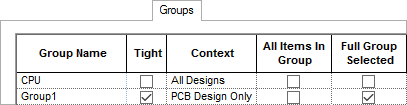
The list shows all the groups to which the selected items belong, together with information about each group. The details displayed here are only for information, to help you understand how the items are grouped.
This includes checkboxes that show you whether the group is a Tight group, whether all the items selected are in the group, and whether all items of each group are selected.