

Use this page to customise and reset menus. This page also allows menu animation and some styling to be defined.
Shortcuts
Default Keys: None
Default Menu: Tools
Command: Customise
Locating this option
Available from: Tools menu > Customise option
Using The Menu Page
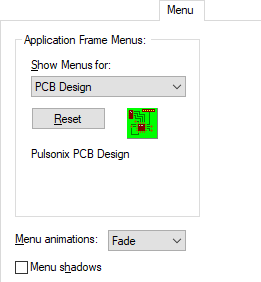
Show Menus for: allows the menus for a different type of design to be displayed allowing them to be customised.
Pressing the Reset button will reset the selected menu back to its original default settings. Any user customisation will be lost.
Menu Animation specifies the type of animation effect to be employed when a menu is displayed. Choose one of the animation styles from the drop down list.
The Menu shadows check box enables you top specify whether or not a menu is displayed with a shadow.
Commands tab
Toolbars tab
Tools tab
Menu tab (this page)
Keyboard tab
Application Look tab
Options tab