

This dialog is used to obtain specific information about the licensing information that Pulsonix uses. Use this page to extract information requested by the Pulsonix sales or support team for your machine MAC address or serial number.
An overview of the licensing process can be found on the Licenses page.
Using the About dialog
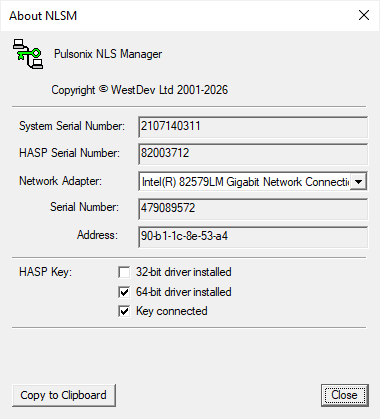
The list is split into the various licensing types that Pulsonix can use. You license will be based on one of these types; (System Serial Number, HASP Key, MAC Address). Some of the license types are derived from others, such as Serial Number based on the Address. Other types may be shown but not used, such as the system serial number which is always available.
Care should be taken and we recommend that you do not change the Network Adapter from the initial one selected by Pulsonix unless our team tell you to.
HASP Key
This shows the version of the HASP driver installed, 32 or 64 bit, and whether the key is actually connected. This is verification only and cannot be changed.
Copy
This button will copy the information in this dialog to your clipboard. You may be required to send this to us so that we can license your product or to allow us to see what license or MAC address you are using.
One important note about the information displayed here; the MAC Address displayed, may or may not be the one that the ipConfig program displays. It is vital that the address shown in this dialog is given so that Pulsonix is using the one it sees.
Close
Use the Close button to close this dialog.