

Sign In is a page of the Vault Setup dialog, and is the place where you enter the parameters that allow you to connect the Pulsonix application to your Vault.
Shortcuts
Default Keys:
Default Menu: Setup
Command: Vault Setup
Using the dialog
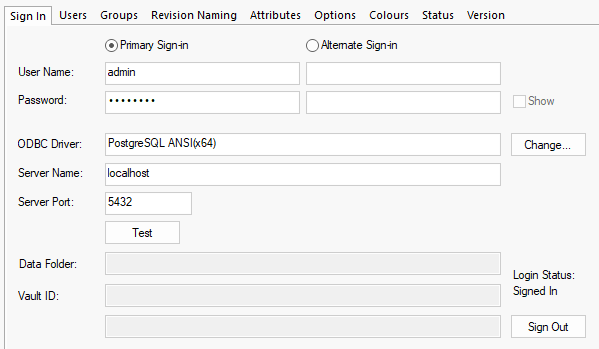
Enter the username and password you have been assigned to access the Vault. Note that this is completely separate from your Windows login, although your Vault administrator may have created Vault users with the same names as their Windows login accounts.
Enter the name of the server on which the Vault database is running, and the port number (default 5432).
ODBC Driver
The Change button will open the Change ODBC driver dialog. From here you can select a Postgres ODBC driver from a list of currently installed drivers on your computer. Otherwise, you can press the Default button to select the default Vault ODBC driver. Also, when testing a connection, Pulsonix will attempt to use the driver specified, if it fails, it will automatically attempt to find and use an alternative driver. If one is found, you will be prompted that their selection does not work but this found working driver will be used.
Test
Click the Test button to validate your connection to the Vault. If successful, a popup message will confirm a valid connection to the Vault, and the Data Folder box will be filled in with the network location of the Vault data store.
Sign Out
Click the Sign Out button to sign out of the vault and remove current user login details. Once signed out, you can cancel out of the dialog. Note that you will need to sign in again to continue to use the vault. Once signed out, all tabs except Sign In and Users will be hidden until you sign in.
Alternate Sign-in
To assist users who may require a different user sign-in profile to work with a different set of permissions, there is an optional Alternate Sign-in setup that allows you to enter a different user name and password.
If you click Test and get error messages about being unable to connect to the database, or a popup dialog about selecting a Data Source, then it is possible that either you do not have a Postgres ODBC driver installed, or that the version of that driver requires a different connection setup to the ones that the Pulsonix application knows about.
The drivers Pulsonix knows about are:
- PostgreSQL ANSI
- PostgreSQL ODBC Driver(ANSI)
If you are using a driver that has a slightly different name, you will need to use that name in the ODBC Driver field of the Vault Setup dialog.
Related Topics
Vault Overview | Sign In | Users | Groups | Revision Naming | Attributes | Options | Colours | Status | Version