

The Open option is used to load designs into Pulsonix. The design types possible for opening are not only
limited to Pulsonix binary format files (.PCB) but also ASCII files from other systems.
Multi-sheet schematics are opened through the one schematic design which contains the individual sheets.
Designs can also be opened by dragging and dropping the file onto an open Pulsonix application.
Shortcuts
Default Keys: Ctrl+O
Default Menu: File
Command: Open
Files Of Type
Use this to filter the types of files reported in the display list available for opening. Once a ‘type’ is selected e.g. PCB Designs (\*.PCB), the next time the Open dialog is used the option will remember the design type of PCB.
Designs Opened by someone else
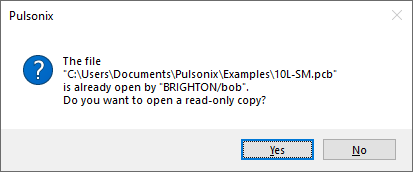
If you attempt to open a design that is already opened by someone else, their system would have created a lock file that will now be read by you. A warning will be displayed informing you of the user who has opened it. you can proceed but will only be able to open that design in read-only mode.
Previously Opened Designs:
If a design has been opened previously and recently, it will appear on the File menu as one of the recently used file list. It can be quickly opened by selecting the corresponding number next to the file name or by selecting it from the list.
Open Last Active Page
When working with a multi-page Schematic design, there is a switch on the Display page of the Options dialog that allows you to only show the last active page when the Schematic file is next opened.
Active Page in this context means the page you were currently viewing (the ‘top most’ one of all the pages currently open) when the design was last saved. You have to save the file for that page to be marked as the Active page.
Designs Locking
User Information for a currently Open Design
When a design is opened, a lock file is created containing some details about the user who had opened the design. When attempting to the same open design (saved in the same version), the lock file is read and the computer name and user name of the person who has the design open is reported as a warning message.
This only applies to Schematic and PCB designs.
A note about lock files - if you find a lock file has been left behind and the design is not open, the lock file can be safely removed without any detrimental effect on the design it is related to.
Related Topics
Files of type | Options dialog | Recently Used File List | Save | Save As