

This dialog allows you to enable dynamic checking for diagnostic purposes.
Locating this option
Available from: Design Properties - Statistics > Design Verify button
Using this option
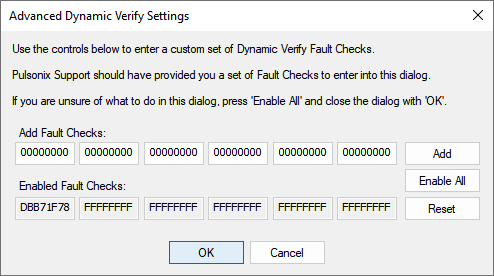
Enabling this option will allow checking which is continually performed whilst you are working, and will flag an error as soon as it has been encountered. This is really helpful in diagnosing the cause of a problem and keeping the quality of the software as high as possible. Of course, Dynamic Checking will have an effect on performance, so should only be used when necessary.
The 6 number Signature value presented on the Statistics page, shows if any faults have been found in the current design. The fault free situation is shown by 6 zeros. When you enter the Enable Checking dialog, it shows 2 rows of 6 values. The top row is initialised to a more detailed presentation of the current Signature. The lower row shows the current dynamic checks being performed. You can edit the numbers in the top row, and in some circumstances you will be advised to do so by our Technical Support.
Add
Use Add to add the checks shown in the top row to the Enabled Fault Checks to be performed in the lower row.
Enable All
Use Enable All to enable all the checks available, this is the recommended setting.
Reset
Use Reset to reset all the dynamic checks to 0 (not checks to be performed).
OK
Press OK to save the selected checks and return to the Design Verify page.