

This dialog is used when when you are importing Schematic designs or project from Circuit Mind.
The import accepts Schematic designs with the .SchCme file extension and also Projects with multiple Schematic sheets with the .PrjCme file extension.
Using the Import dialog
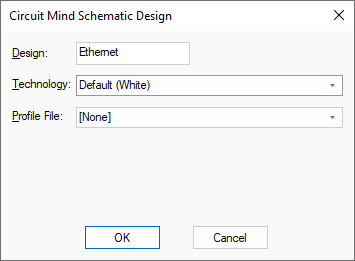
Design
Design This is the name that will be used as the basis of the filename when you save the design.
Technology
This drop down list can be used to choose a Technology file to base the imported design on. You do not have to base it upon a Technology file, as you can select [None] to specify no Technology. This means the design will be a direct import of everything in the ASCII file being imported.
Profile File
This drop down list can be used to choose a Profile file to use during import. A Schematic Profile is used in addition to the Technology file to present a starting point for the design. It contains start information such as a drawing blank and other general documentation. It could also be used to contain company or project based information which is mandatory or is required on all schematic sheets which make up a particular design.