

Many aspects of the license server are controlled using a configuration file. This allows quite complex configuration to be achieved without the need to learn how to use numerous complicated dialogs.
The server will run without a configuration file, so you would only need to create and use one if you need to specify any of the additional controls or features that are not available directly from the Options dialog, or to override any of the default settings such as port numbers.
Using Configuration Files
A configuration file is simply a plain text file that can be created and modified with any text editor. Commands are available to control user access to certain licenses, or how the server behaves in certain situations.
For example, to retain three copies of the ‘Save PCB’ license for use by the Layout department, you may just need to add the following commands:
users layout robert geoff alice michael sysadmin
reserve savepcb users layout 3
Or, to prevent anyone on a particular computer from using the application at all:
deny application computer demo_room
Using the Configuration dialog
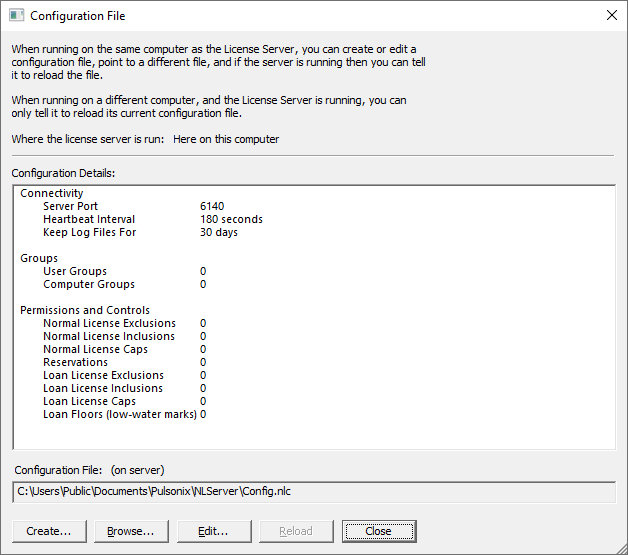
Note: some of these buttons are only available when running NLSM on the server itself as you cannot edit the underlying configuration file when running remotely.
To create a new configuration file, use the Create button. This will prompt you to specify the name and location of your new configuration file, then open that empty file in your normal text editor so you can start adding your configuration commands.
If you already have a configuration file and wish to change commands in it, use the Edit button to open your file in your normal text editor.
Use the Browse button to instruct the server to use a different configuration file.
Use the Reload button to instruct the server to re-read the configuration file after you have finished editing it, or perhaps after you have restored a previous version of the file from backup.
Also displayed on the dialog is a list of the key information that has been loaded from the current configuration file. This list is useful to verify that you have set up the correct commands in your configuration file.
More Information
This is only a brief description of the functionality available, for a more detailed description of the commands that can be used in configuration files, please refer to the ‘Pulsonix Network Licensing’ User’s Guide.