

This page will show you the version details of the currently connected Vault. In order to view this page and update, you will need to be logged in as a user with the Database Maintenance permission.
Using the dialog
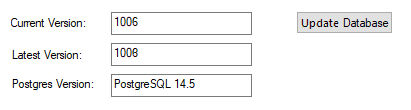
Current Version
Shows the Vault format version of the connected Vault database.
Latest Version
Shows the up-to-date format version available.
Postgres Version
Shows the Postgres version being used for the connected Vault database. Version 14.5 is the version currently supported with Pulsonix.
Updating the Database
When a Vault format update is available, the Update button will be enabled. You will also get the update notification every time you launch the Vault Manager dialog. This notification can be turned off in the Options, Warnings page under Prompt Vault Database Updates.
Update Database
Before updating, we highly recommend that you perform a full Vault backup from the Vault Admin application. When ready, you can proceed by clicking on the Update Database button which will handle the updating process.
Related Topics
Vault Overview | Sign In | Users | Groups | Revision Naming | Attributes | Options | Colours | Status | Version