

This page can be found on the Define Source dialog and is used to edit a source device.
Use it to define the values for a Pulse Waveform device.
Shortcuts
Default Keys: F7
Command: Edit Spice Value/Model
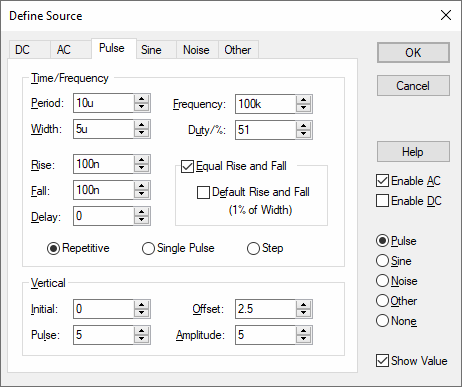
How To Define A Pulse Source
On selection the following dialog will be displayed:
The diagram below defines the waveform timings:-
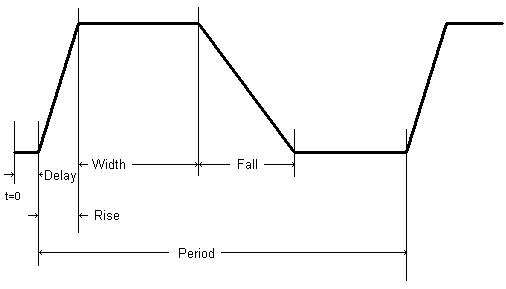
Frequency = 1 / Period
Duty = (Width + Rise/2 + Fall/2) / Period
Some parameters can be specified in more than one way. For example both Frequency and Period edit controls are supplied. Changing one will cause the other to be updated appropriately. The same applies to Duty and Width, and the Vertical controls in the lower half of the dialog. The Vertical aspect of the signal can be specified using Initial Value and Pulsed Value, or by using the Offset and Amplitude of the signal.
If Rise or Fall are set to zero or negative, then they will use the Time Step, which is a the first parameter of the .tran Transient Analysis simulator control.
If a Step pulse is used, the pulse Width will be equal to the Stop Time squared. The Stop Time refers to the end time of the Transient Analysis.
If a Single Pulse is used, the Period will be equal to the Stop Time.
PulsonixSim requires a positive non-zero pulse width to avoid errors.
Source Pages
Click on one of the links below for details of the relevant source page.
Universal Source | DC Source | AC Source | Pulse Source | Sine Source | Noise Source | Other Source