

This dialog allows you to check out, copy out or uncheck a format file from the Vault.
Using the Dialog
Vault Item List Box
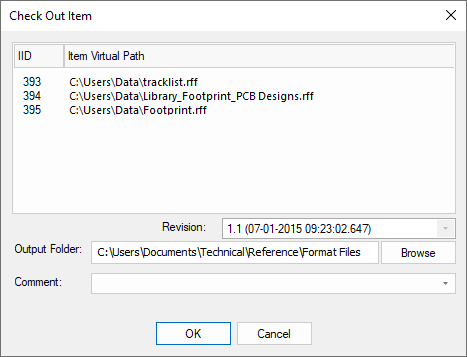
The list box will display all the format files in the currently connected Vault. The first column will contain the item’s Vault ID whilst the second column contains the Vault virtual path to this file. Selecting an item from the list box indicates that you want to perform the action against that item.
Vault Revision
The revision box below the list box will display all the revisions of the selected item. You can select the revision of the item to be actioned on here.
Output Folder
The output folder is the path to where you would like the Vault format file Checked / Copied out to. You can manually type in a path or use the Browse button to open the file explorer.
Comment
When Checking Out or Unchecking a Vault format file, you must provide a comment. This comment should be written here.
Remove Local File
When Unchecking a Vault format file, tick this check box to remove the local copy of the format file you are unchecking.