

Network Licensing is a licensing scheme that allows you to use your Pulsonix licenses in a very flexible way. Licenses are controlled by a small application (the Network License Server), and each Pulsonix application talks to this server to acquire and release the licenses it needs. This allows you to ‘share’ your licenses between a number of different users without having to install individual licenses and keys on each machine.
Overview
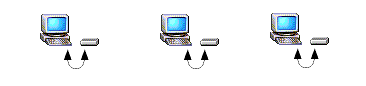
Node Locked
Using the Node Locked Licensing scheme, access to Pulsonix licenses is controlled using a security device (a ‘dongle’ or ‘key’ that is attached to a USB port, or a unique network address) on the computer on which the Pulsonix application will be run. On starting, the Pulsonix application itself communicates with the security device, and uses information retrieved from there to unlock and access the licenses contained in a license file.
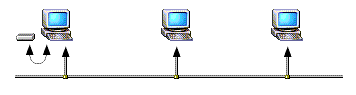
Network Licensing scheme
Using the Network Licensing scheme - sometimes called ‘floating licenses’ - the license file and security device are managed by the License Server, and each time a Pulsonix application is started on any machine on the network, Pulsonix communicates with the License Server to request the licenses that it needs. Where the number of concurrent licenses is limited, the Pulsonix application may not be given the required license.
For example, if there are three PCB Layout licenses specified by the license file, and there are already three people using Pulsonix for PCB work, no more PCB Layout licenses will be available, so any attempt to open a PCB design on a fourth computer will result in the design being opened ‘read only’. When one of the people using PCB closes their Pulsonix application, this automatically releases the PCB license for use by someone else.
Network Requirements
The network requirements for Network Licensing are quite straightforward. The underlying communication between Pulsonix and the License Server is done using a mechanism called ‘TCP/IP Sockets’. This should be available to you as an integral part of the operating system.
If you are in any doubt about whether your system or network is correctly set up to allow Network Licensing to operate, you should consult your system or network administrator.
Installation
The method used for installing and operating the License Server will depend on how you wish it to work.
The server can be run as a special kind of application called a ‘service’ that is started automatically as the computer starts up, or as a ‘normal’ application. When you start off with Network Licensing, it is sometimes easier to run it as a normal application to start with, making it easier to see what is going on and to ensure that everything is correctly set up. However, to achieve the best results in terms of continuity and security, it is recommended that the license server be installed and run as a service.
Administration of the Network License Server
The Network License Server is administered using the Network License Managerapplication (NLSM), regardless of whether the Network License Server Daemon (NLSD) is being run as a Windows service or as a normal application.
Either way, the user interface for the administration of the License Server is the same. You never see the NLSD program at all, it has no user interface and runs ‘invisibly’. Administration of the License Server is generally done on the computer on which the License Server is running, although administration of some features can be done remotely across the network using NLSM from a workstation computer.
Find Out More
Full details on installation, configuration and maintenance of the License Server can be found in the “Pulsonix Network Licensing.pdf” which can be found in a Documents sub-folder where your Pulsonix software is installed. It can also be accessed from the Help menu of the Pulsonix application, or can be downloaded from our web site.