

This dialog allows you to view license file information and manage the license file used by the server.
Using the dialog
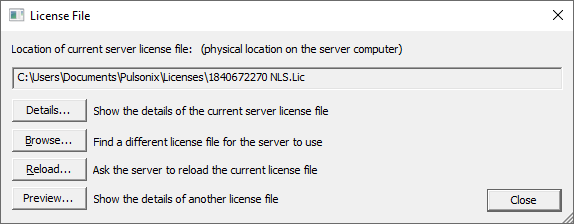
Details
Use the Details button to display the information about the current server license file. This should include the security device type and serial number, the expiry date if there is one defined, and a list of the features in the license file.
Browse
use this button to browse to a different license file for the server to use.
Note: you can only browse to a different license file when you are using NLSM on the server itself, as the license server has to be able to access this file within its own file system.
Reload
Selection of this button will prompt you to confirm that you want the server to reload its license file. You can use this for example if you have purchased additional features for your Pulsonix software. If you copy your new license over the existing one on the server, clicking Reload will tell the NLS Daemon to re-read that license file and update its internal list of available features. This will not take away any license features already booked out by clients.
Preview
This button allows you to simply browse to a license file and see what license features it contains. This license is displayed in the License Details dialog without actually using the license file or applying it to the server. This can help you confirm whether the license is for the current product or the previous one, or if certain options are enabled, like High Speed for example.