

Use this option to show and position visible attributes onto items in the design.
It can be used to show attributes that are, as yet, undefined. For example, a “Part Name” attribute in a PCB footprint that only gets fulfilled once used in the design.
Shortcuts
Default Keys: None
Default Menu: Insert
Command: Insert Attribute Position
Locating this option
Available from: Insert menu > Insert Attribute Position option
Using Insert Attribute Position
Select the item that you want to show the attribute on, or deselect everything to insert a design level attribute position.
When the option is run you are presented with the following dialog:
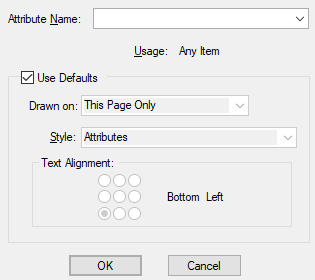
The item you are adding the attribute position to is shown in the title bar of the dialog.
Attribute Name
Type the name of the attribute you wish to position, or use the drop down list to select an attribute name that
already exists in the design.
Usage
When a new attribute name is supplied, use this drop down list to select the
required usage. The usage list will be restricted to those appropriate to the
selected item. For existing attribute names the usage shows the value already
assigned to it and cannot be changed.
System attribute shown in brackets cannot be changed once added, however, user defined
attribute usage can be changed using the Technology dialog and
Technology - Attribute Names page.
Use Defaults
Keep this box checked to use the default style, etc. as defined on the
Attribute Defaults tab.
Note that you can define specific defaults for each different
Attribute Name.
Unchecking this box allows you to set the values to use for the Attribute Position you are about to add.
Placing the attribute position
Press OK to start placing the attribute position and use the mouse to place it
in the correct position. If the attribute is already defined it’s value will be
displayed, otherwise the attribute name will be displayed encased between curly brackets.
System Defined Attributes
There are a number of system defined attributes which you can place on your design. The values for these attributes are found by the program. Some can only be attached to items of the appropriate type. The attributes always have a name enclosed by brackets < and >.
A full list of these and their use can be viewed on the System Attributes page.
Related Topics
Insert Attribute | Technology - Attribute Names | System Attributes | Document Properties