

This page can be found on the Define Source dialog.
Use it to directly define the Spice command for a Source device. For example a Piece Wise Linear Source, Exponential Source or a Single Frequency FM Source.
Shortcuts
Default Keys: F7
Command: Edit Spice Value/Model
How To Define A Source’s Signal
Use the Define Source dialog to edit a source device. Click on the Other tab.
The following dialog will be displayed:
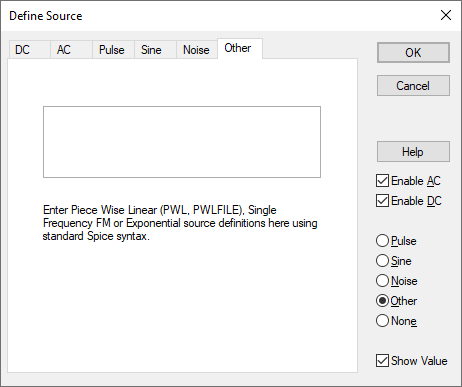
This is used to enter stimulus sources not directly supported by other source pages. Here, the raw text command to specify a source can be entered.
The following three source commands can be specified:-
Piece Wise Linear Source
pwl ( T1 V1 [T2 V2 [T3 V3 [… ]]] )
Each pair of values (Ti Vi) specifies that the value of the source is Vi at time = Ti. The value of the source at intermediate values of time is determined by using linear interpolation on the input values.
Exponential Source
exp ( V1 V2 [TD1 [TAU1 [TD2 [TAU2 ]]]] )
where:
V1       Initial value (Volts or amps).
V2       Pulsed value (Volts or amps).
TD1     Rise delay time. Default if omitted is zero.
TAU1   Rise time constant. Default if omitted or zero is the Time step.
TD2     Fall delay time. Default if omitted or zero is TD1 + Time step.
TAU2   Fall time constant. Default if omitted or zero is the Time step.
The Time step is specified in the Transient Analysis.
Single Frequency FM Source
sffm ( VO VA [FC [MDI [FS ]]] )
Defined by:
V(t) = VO + VA.sin[2.p.FC.t+MDI.sin(2.p.FS.t)]
where:
VO     Offset (Volts or amps).
VA      Amplitude (Volts or amps).
FC     Carrier frequency (Hz). Default if omitted or zero is 1/Stop time.
MDI    Modulation index. Default if omitted is 0.
FS      Signal frequency (Hz). Default if omitted or zero is 1/Stop time.
The Stop time is the end time of the Transient Analysis.
Editing Multiple Components
If the description is set to <Different> then some of the components you are changing have different source descriptions. Clear this field and enter the required value for all components, or leave as <Different> to tell components to keep their original descriptions.
Source Pages
Click on one of the links below for details of the relevant source page.
DC Source | AC Source | Pulse Source | Sine Source | Noise Source | Other Source